

FeaturesSecurity & firewall
Server security settings, applied during setup.
A new server comes up with the firewall denying incoming traffic except on the ports a web server needs, and every site gets its own system user and database credentials. Keys, rules and access are managed from the dashboard.
Free plan available. Features vary by plan. Server costs are separate.
How it works
- Step 1
Configured during setup
The firewall and the per-site separation are applied while the server is being prepared, not left as a checklist for afterwards.
- Step 2
You manage the keys
Add an SSH key per person and remove it when they no longer need access. Removing one key changes nothing for anyone else.
- Step 3
Rules stay editable
Open a port to a specific source address, close one you no longer use, and see the current rule set in one list.
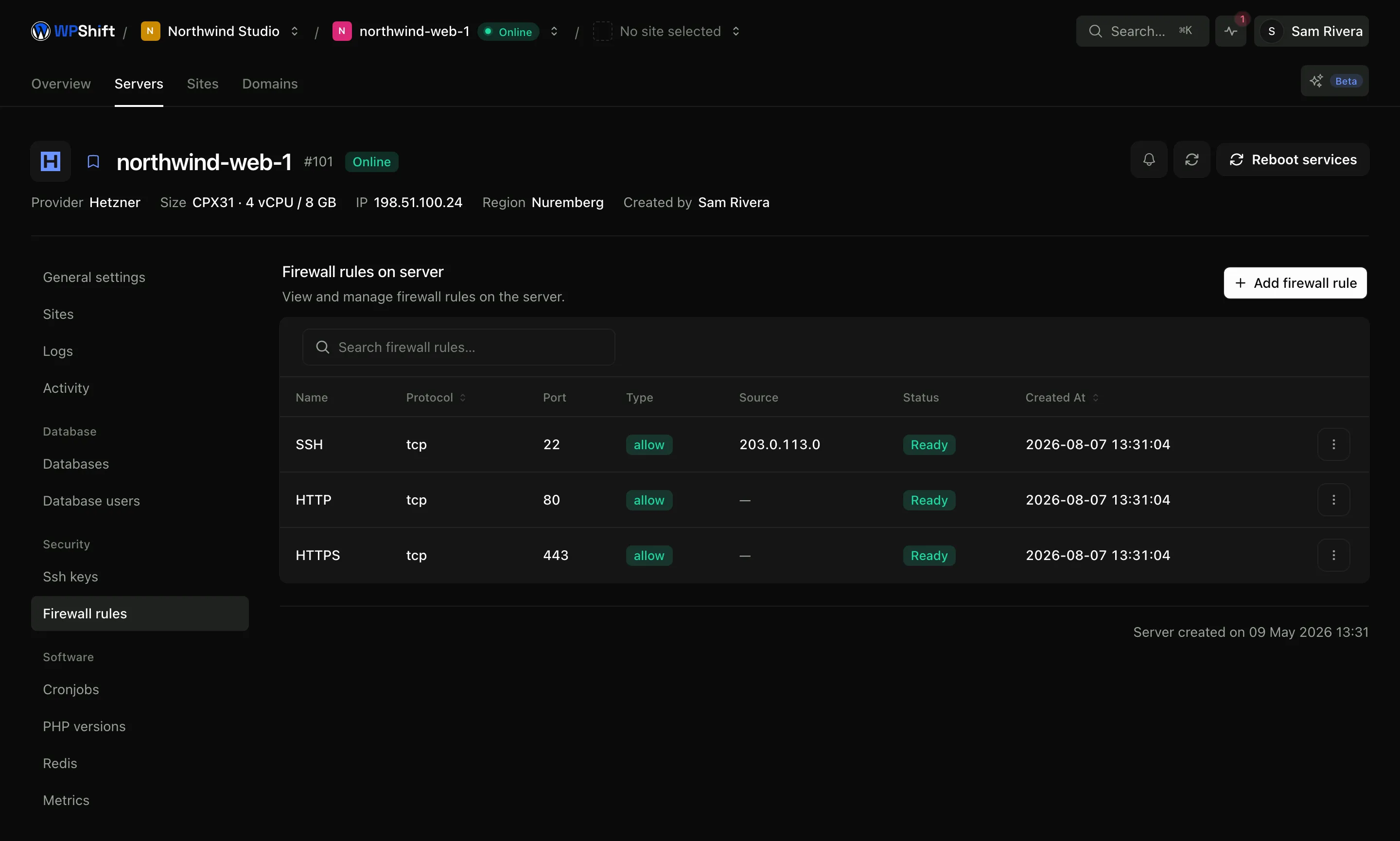
The firewall denies incoming traffic by default
Incoming connections are refused unless a rule allows them. The ports a web server needs (HTTP, HTTPS and SSH) are opened during setup. From there you can add a rule for a specific port and source address, or narrow one that is currently open to everyone.
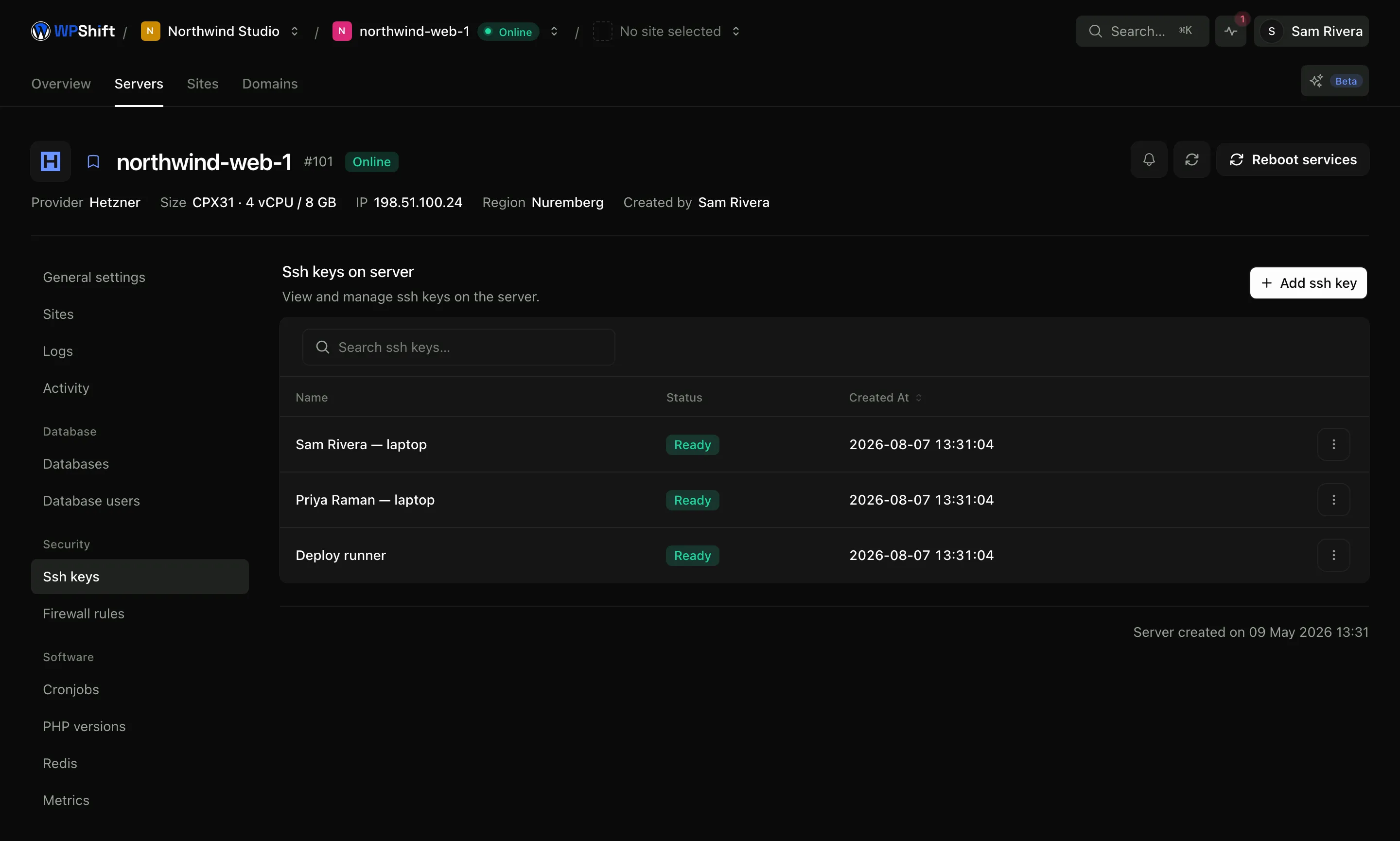
SSH keys, managed per person
Add a key for each person who needs server access and delete it when they leave. Because access is not shared, removing one person does not mean rotating a credential that several people rely on.
Each site runs as its own user
A site's files belong to its own system user, its database credentials open only its own database, and its SFTP access is confined to its own directory. That limits how far a compromise on one site reaches. It is a boundary, not a guarantee that sites cannot affect one another, because they still share the machine's CPU, memory and disk.
Operating-system updates
The dashboard shows which packages have updates available on each server and applies them when you choose. Reviewing that list is part of looking after a server, and it is separate from WordPress: core, themes and plugins are updated on their own.
A failed firewall change rolls itself back
The current rule set is copied aside before any change is applied. If a single rule is rejected, the previous set is restored and the change reports a failure. What that avoids is the state that makes firewall edits on a remote machine worth worrying about: a half-applied rule set, the server reachable on some ports and not others, and no record of what it looked like beforehand.
Common questions
What is configured during server setup?
A firewall that denies incoming traffic except on HTTP, HTTPS and SSH, and per-site separation: each site gets its own system user, its own directory and its own database credentials.
Can one compromised site reach the others on the server?
Not through files or database credentials, which are separate for every site. The sites do share the server's resources, so a compromised site can still affect how the others perform. Treat the separation as a limit on damage rather than as a guarantee.
Does this replace a WordPress security plugin?
No. These are server-level controls. Keeping WordPress, themes and plugins updated, managing WordPress accounts and watching for changes inside the site are separate jobs that a plugin can help with.
Are operating-system updates applied automatically?
No. WPShift lists the available updates for each server and applies them when you ask it to, so applying them stays a decision you make. Decide who reviews that list and how often.
How do I remove someone's access?
Two steps, and both are needed: delete their SSH key from the servers they could reach, and remove them from the workspace in WPShift. Removing dashboard access does not by itself revoke a key already installed on a server.
What happens if a firewall rule fails to apply?
The previous rules are restored and the change is reported as failed, so the server is never left half-configured. That protects you from a rejected rule, not from a rule that applies exactly as written and closes a port you needed. Port changes are still worth reading twice before saving.
Keep reading
- Cloud serversConnect your cloud account and let WPShift install and configure the server for WordPress.
- Team accessOrganise client work into workspaces and give each person their own account.
- SSL certificatesIssue free certificates, renew them automatically and see when a renewal needs attention.
- BackupsSchedule off-server backups and restore a copy when you need to recover a site.
Set up your first WordPress server
Connect your cloud account, let WPShift prepare the server, and add a site.
Free plan available. Paid plans include a 7-day trial. Server costs are separate.