

FeaturesAI Copilot
Get help with your servers and sites.
Copilot answers using the records in your workspace: your servers, sites, domains, and the step-by-step output of the operations that ran on them. That is what lets it explain the failure in front of you rather than the general case.
Free plan available. Features vary by plan. Server costs are separate.
How it works
- Step 1
Operations are recorded step by step
Every action WPShift runs keeps its steps, commands, exit codes and output, including attempts that were later retried.
- Step 2
Copilot reads that record
It works from the failure in your workspace rather than from a general description of the task.
- Step 3
You approve anything it would run
A proposed action is shown to you with its arguments and stays pending until you approve or decline it.
It answers from your own records
Copilot has access to the resources in the workspace you are working in: this server, this site, this certificate, this failed operation. A question about your setup gets an answer about your setup rather than about WordPress hosting in general.
A failure with its output attached
Each attempt keeps its own output, so a retry never overwrites the run that failed. When Copilot says a certificate request failed on a missing DNS record, it is reading the recorded step, and you can open the same record and check.
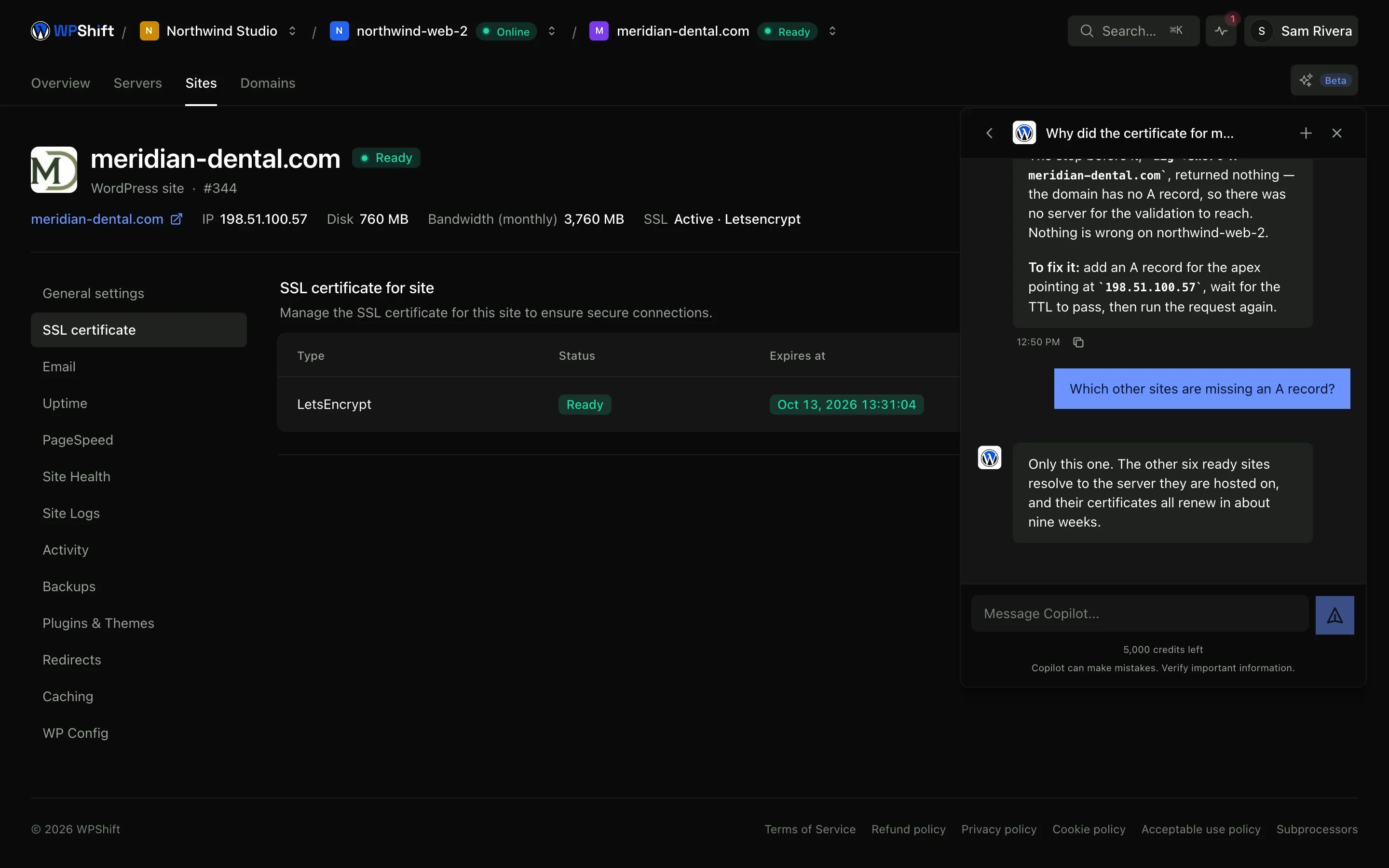
Proposed actions wait for approval
When Copilot suggests running something, it creates a request showing the action and its arguments. Nothing runs until you approve it, the request can be declined, and it expires if it is left alone.
The routine questions too
Which sites are on an older PHP version, which certificates renew this month, which server is closest to filling its disk. Quick to answer from the record, and tedious to check one at a time.
Common questions
What can Copilot see?
The resources in the workspace you are working in, and the recorded operations that ran on them, including each step and its output.
Will it change things on my servers?
Only with your approval. A proposed action is recorded as a request showing what would run, and it stays pending until you approve or decline it.
Which plans include Copilot?
Copilot is available on higher plans and uses a monthly credit allowance. See the plan comparison for the allowance and the options for additional credits.
What if an operation failed and then worked on a retry?
Both attempts are kept. The failed one still carries what it ran and what came back, which is usually the more useful of the two.
Is it always right?
No. Treat the explanation as a starting point, check it against the records it cites, and be particularly careful before applying a suggestion to a live site or server.
Keep reading
- Uptime monitoringCheck whether sites respond, keep the history, and get an alert when checks fail.
- Server monitoringTrack CPU, memory, disk usage and load, with the history behind each reading.
- Cloud serversConnect your cloud account and let WPShift install and configure the server for WordPress.
- Team accessOrganise client work into workspaces and give each person their own account.
Set up your first WordPress server
Connect your cloud account, let WPShift prepare the server, and add a site.
Free plan available. Paid plans include a 7-day trial. Server costs are separate.