

FeaturesPageSpeed monitoring
Track your site's performance scores over time.
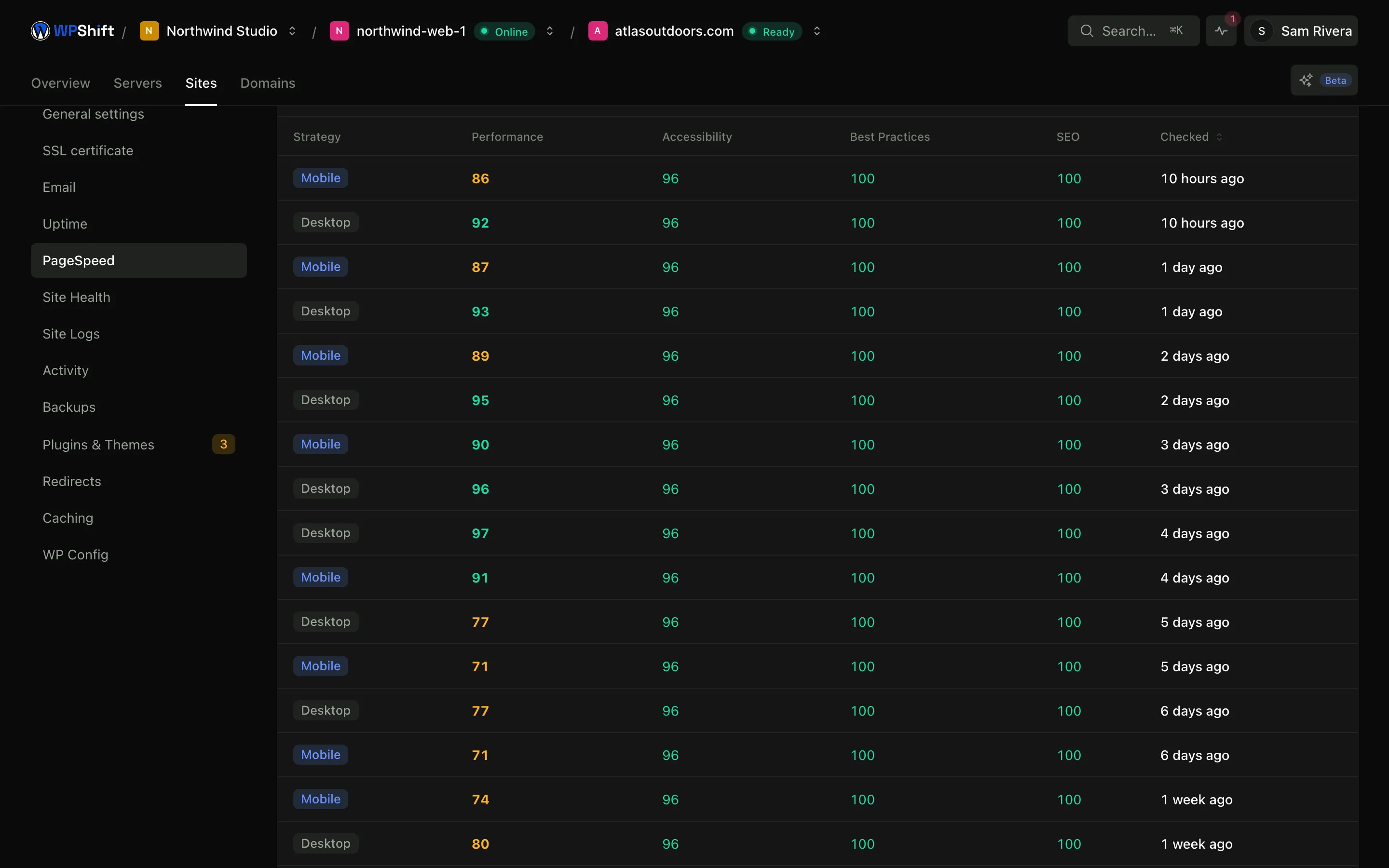
WPShift runs a scheduled PageSpeed Insights test against each monitored site, on mobile and desktop, and keeps the results. One score tells you where you are; the history tells you when something changed.
Free plan available. Features vary by plan. Server costs are separate.
How it works
- Step 1
Tested on a schedule
Tests run against the live site through PageSpeed Insights, rather than only when you remember to check.
- Step 2
Mobile and desktop kept apart
The two tests measure different conditions, so they are recorded and shown separately.
- Step 3
Alert on a threshold
Set the score you want a site to stay above and get an alert when a result comes back below it.
A history gives a change a date
A single test gives you a number with no context. A series shows that a site sat around one score for weeks and dropped on a particular day, and a date is what turns "the site feels slower" into something you can investigate.
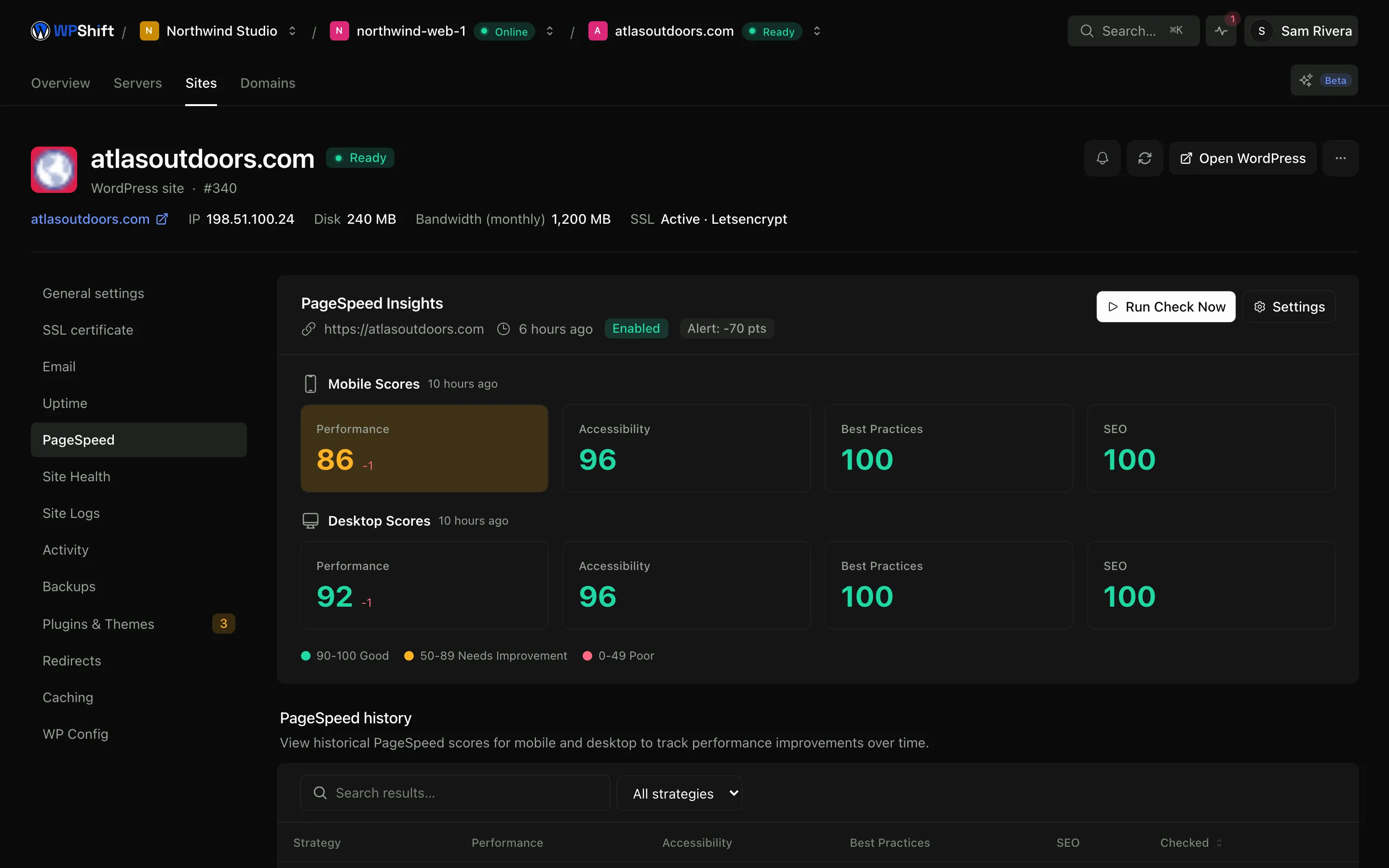
Mobile and desktop measured separately
A page can perform well on a desktop connection and poorly on a phone, usually for a reason specific to one of them. Averaging the two hides exactly the part worth knowing.
These are lab tests
PageSpeed Insights runs the page under controlled conditions, which is what makes results comparable from one day to the next. It is not the same measurement as field data collected from your real visitors, and it should not be read as one.
The settings that affect the score are nearby
Caching, the PHP version and the plugin list are on the same site in the same dashboard, so acting on what the history shows does not mean going somewhere else to do it.
Common questions
Are these real PageSpeed scores?
Yes. Tests run through PageSpeed Insights against your live address, so the numbers are the ones you would get testing by hand. The difference is that they run on a schedule and are kept.
Is this Core Web Vitals data from my visitors?
No. These are lab tests run under controlled conditions. Field data gathered from real visitors comes from Google's own dataset and is a separate measurement.
Will a better score improve my search ranking?
The tool measures and records; it does not change the site or guarantee a ranking change. Page performance is one factor among many, and a slow page costs you visitors regardless of ranking.
How do I find out what caused a drop?
Start from the date. Check what was updated, installed or published around it, and compare against the site's plugin list and logs. The tool narrows the window; it does not name a cause.
Which plans include PageSpeed monitoring?
PageSpeed monitoring is available on higher plans. See the plan comparison.
Keep reading
- CachingReduce repeated work with server-level page caching and a Redis object cache.
- Uptime monitoringCheck whether sites respond, keep the history, and get an alert when checks fail.
- PHP versionsInstall several PHP versions on one server and choose one per site.
- Server monitoringTrack CPU, memory, disk usage and load, with the history behind each reading.
Set up your first WordPress server
Connect your cloud account, let WPShift prepare the server, and add a site.
Free plan available. Paid plans include a 7-day trial. Server costs are separate.